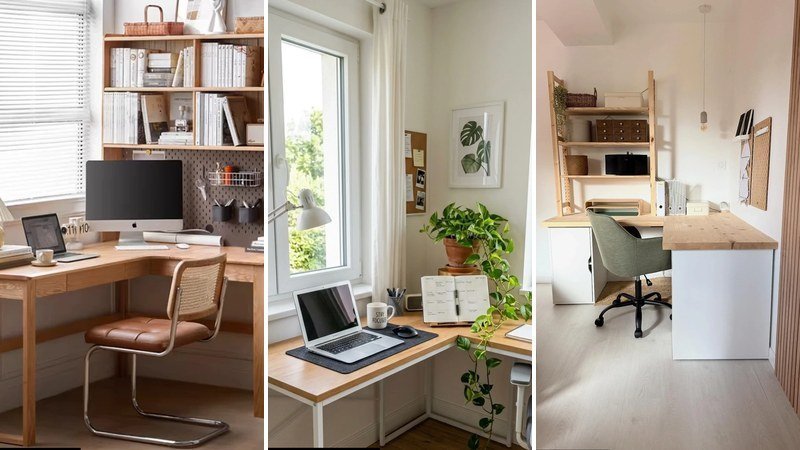
Corner Desk Ideas for a Stylish and Productive Workspace

The saved photos make corner desk ideas look easy: a slim lamp and a neat stack of books. Your actual corner has a radiator and a single bulb that gives up halfway across the desk. The gap is a planning problem, not a decorating failure. A small corner desk works when it is chosen for the room you have, not the room a stylist built in a studio. Sort the awkward parts first, and the pretty part follows. I put this together around real constraints, because a corner that functions beats a corner that photographs.
The mismatch gets worse in a bedroom, where the desk competes with everything else in the room. The same thinking that makes a small home office work counts double here. Once the placement is right, desk organisation decides whether it stays a workspace or becomes a dumping ground.
10 Corner Desk Ideas That Actually Work in Real Homes
Most corner desk ideas online show you rooms that don’t exist — not a single cable, not an odd angle, not the shadow your head casts on the screen at 4pm. The corners they picture are wide, with phantom outlets and invisible storage. Yours probably isn’t like that. This is different. These 10 corner desk ideas come from real setups where someone figured out the lighting, the storage, the chair clearance. They translate pretty pictures into a livable, functional workstation. They’re arranged by what they solve: built-in nooks, L-shaped workhorses, and clever compact shapes that fit where a standard desk won’t. Pick the one that matches the corner you actually have.
When the Desk Becomes the Wall
When floor space is scarce, thinking vertically changes everything — a trick from small home office setups that turns walls into furniture. These three show how a built-in corner desk can vanish into architecture while still handling a full workday.
Warm Oak Alcove with Lit Shelves

by @boyesdesign
This workspace carves a desk into a shallow recessed wall, using every vertical inch. The light oak desktop sits clean against three sides, with two floating shelves overhead. Each shelf hides a LED strip underneath, washing the nook in soft, even light that feels generous rather than harsh. An Apple monitor and open notebook keep it functional, while a glass vase, ceramic bowl, and trailing plant stop it reading as sterile. The grey upholstered chair has a shape that tucks neatly under the desk — its rounded arms clearing the edge — and a beige throw slung over the back adds cosiness if the corner gets cold. Mount the LED strips on the underside of the shelves rather than on top to direct light downward and avoid casting your own shadow onto the keyboard.
White Built-In with a Window Nook

by @kitchen_design_installation
A full wall of white built-in cabinetry turns this corner into a proper workstation without stealing a square centimetre of floor beyond the chair footprint. The wooden countertop bridges two cabinet towers, with open shelves above for books and a trailing potted plant that softens the hard lines. The cabinet doors have a soft-close mechanism, so they don’t jar the desk when shut — a tiny detail that stops your monitor from wobbling. Natural light from the adjacent window hits the work surface at an angle, which is important — it keeps glare off a screen while still feeling bright. The chair tucks fully under the desk when not in use, preserving the path of travel behind it. If your built-in corner desk faces a window, position the monitor to one side rather than centred so you don’t squint against the brightness during video calls.
Navy Blue Corner with Landscape Art

This setup wraps two walls in navy blue cabinetry, with the corner desk forming the anchor. The dark wood countertop contrasts against the painted base, and a matching tall bookshelf rises on the left side, holding books and decorative objects that break up the blue. A framed landscape painting hangs above the monitor, which is a smart visual trick — it gives the eye a place to rest when you look up from the screen. The grey upholstered chair blends into the palette rather than competing, and the window with plantation shutters on the right provides adjustable light control. Dark built-in units in a corner can swallow light, so add a small desk lamp even during the day to create a defined focus area on the work surface.
L-Shaped Setups Worth the Floor Space
A L-shaped desk is the obvious corner choice, but without vertical storage, it quickly becomes a dumping ground. The minimalist office approach of putting only what you use daily on the surface applies here — these five get the balance right.
Pegboard and Slatted Oak Corner

A L-shaped light oak desk anchors this corner, with white cabinet bases that keep clutter out of sight. What makes it work is the vertical thinking: a tall shelving unit rises on one side, a pegboard on the other holds notes and small tools, and vertical wooden slats add texture to the wall without taking up floor space. The slats also scatter sound slightly, so your keyboard clicks don’t carry across the room. A sage green upholstered chair brings a quiet colour note, while a single pendant light with an exposed bulb hangs just low enough to define the zone. A wicker basket sits on the floor for overflow storage. Pegboards work best when you use only half the holes — overfilling turns a tool into visual noise.
Slide Cabinet Desk with Red Lamp

by @mumuliving
This desk does double duty as storage furniture. One side of the L-shape has a sliding door cabinet — smart because it hides less-pretty gear without needing swing clearance in the corner. Open shelves display books and storage boxes, while an acrylic organiser keeps small supplies visible, the clear material blending into the background. A red desk lamp adds a bright punctuation mark against the cream and oak palette, and a pegboard above holds a digital clock and notes. A Marshall speaker and headphones hint that this is also a listening spot. When a corner desk has a sliding component, check that it doesn’t collide with the chair arm when you swivel — pull it open before you buy to be sure.
Mid-Century Walnut with Linen Chair

by @natured_py
A solid walnut L-shaped desk fills the corner with warm mid-century tone. The wood has a distinct grain that adds texture without pattern, and the spindle chair with a light grey linen seat brings in a softer shape. The seat fabric stays cool even in afternoon sun, which matters in a corner that catches light. On the desk, a laptop sits alongside a small lamp and a notebook — the setup is intentionally pared down. Natural light enters from the left, so the lamp only kicks in during evening hours. Two framed black-and-white pictures on the right wall break up the expanse without competing for attention. In a corner with limited surface area, swap a standard mouse for a trackball — it needs zero movement space and prevents your chair arm from banging the wall.
Japandi Corner with Cane Chair

This Japandi-inspired corner layers light oak, cane, and leather for a workspace that feels deliberate rather than decorated. The L-shaped desk has an integrated bookshelf hutch and pegboard above, putting reference books and notes at eye level. The pegboard is used sparingly — just a few hooks — so the wall reads calm, not cluttered. A leather and cane chair brings texture and slight warmth against the pale wood tones, and a potted plant in a woven basket softens the floor line. A chrome table lamp with a rounded shade provides focused task light without drawing attention to itself. If your pegboard backs onto a window, avoid placing paper items directly in the light path — they fade faster than you think.
Sunlit L-Shaped with Corkboard

Placing a desk between two windows sounds risky — glare from both sides — but this setup proves it can work. The L-shaped light oak desk sits in the corner, flanked by windows with sheer curtains that diffuse the light without darkening the room. A corkboard mounted on the wall holds pinned reminders, and a framed botanical print adds a calm natural element that echoes the trailing plant on the desk. The white office chair blends into the wall colour, so the room reads bigger, and its mesh back keeps things airy. A laptop, planner, and mug with a motivational phrase confirm the space is lived-in. On a double-window corner, use adjustable curtains rather than fixed blinds; you’ll want to block one side and keep the other open depending on the time of day.
Compact Shapes for Impossible Corners
Sometimes a standard L-shape wants more depth than your corner can give. That’s when an unusual desk shape saves the room — and makes the corner feel intentional. For more small space inspiration, the logic is the same: float what you can, build up what you can’t.
Triangular Desk with Sherpa Chair

A triangular desk purpose-built for corners wastes no surface area. This one has a light oak laminate top, a white metal frame with adjustable levelling feet, and a cup holder attached to the side — a small detail that saves you from knocking over a mug onto the keyboard. A curved computer monitor fits flush against the wall, leaving room for a glass vase of flowers and a small mirror that bounces light around. The cream sherpa chair is the soft focal point, inviting touch against all the hard materials. A cup holder attachment only works if it’s on the side of your dominant hand, so check before mounting — reaching across your body to grab a drink defeats the purpose.
Curved Floating Desk on Dark Walls

Dark-painted walls in a corner can feel like a cave, but this setup leans into the moodiness with a clever trick — a curved floating desk that appears to hover. The dark stained wood top matches the charcoal walls, while three floating shelves on the left display books, a bowl, and plants. The books are turned so the pages face out, which creates a softer visual texture than rows of spines. A brown leather swivel chair adds warmth, and a wall sconce mounted above provides directed task light. A row of candles on the desk near the window offers a soft, flickering alternative when the overheads go off. Floating desks in corners must be mounted to wall studs on both sides; using only drywall anchors on one side will cause the desk to tilt within weeks.
Why Your Corner Desk Material Matters More Than You Think
Solid wood and tight corners don’t mix well: Real timber expands and contracts with the seasons — wedge a solid beech desk between two fixed walls and you’ll hear it creak, or worse, see a hairline crack form along the join. Engineered wood with a stable core, like plywood or high-density MDF with a real wood veneer, stays exactly the same size year-round. That matters when every millimetre counts and you can’t shift the desk forward to give it breathing room.
Laminate beats wood near south-facing windows: Direct sun bleaches natural wood finish in under a year, turning a rich walnut into a patchy, sun-faded ghost. A quality laminate surface with UV-resistant topcoat won’t fade or crack the way many solid woods do — it’s the smarter pick when your corner catches hours of afternoon light. Bonus: a micro-rolled texture hides the fine scratches from a chair arm repeatedly knocking the edge.
Metal frames in damp air need more than paint: A corner in a laundry nook or a powder room that doubles as an office traps humidity. Thin painted metal rusts at the joints in months. Powder-coated steel with sealed welds resists corrosion far longer, and the finish doesn’t peel. If you’re placing a home office corner desk near a steamy zone, check the frame spec before you buy — it’s the first part to fail.
Finish hides more than you realise: Glossy white desks broadcast every scuff from a handbag buckle or the underside of a laptop. A matte laminate, especially one with a fine stone or linen texture, masks daily wear and keeps the corner looking tidy without constant wiping. In a tight spot where you twist in and out of the chair dozens of times a day, that finish choice pays off silently.
Weight stops wobble, not just holds weight: A heavier desk made of MDF or solid wood dampens keyboard vibrations — your monitor stays still while you type, even if the corner sits on a floating engineered floor that amplifies movement. Lightweight hollow-core tops transmit every tap to the screen. That stability makes long hours easier on the eyes, and it’s a detail most shoppers overlook until they’re staring at a jittery webcam feed.
Room type changes the material rulebook: In a bedroom nook, a solid wood surface with a natural oil finish feels warm under your forearms and suits the quiet atmosphere better than cold metal. For a kitchen corner that turns into a command centre, a quartz composite or sealed laminate handles spills, sticky notes, and the odd coffee ring without a mark. In a bathroom-adjacent hallway, the moisture-resistant combo of powder-coated steel and waterproof laminate outlasts anything with wood grain. Small corner desk setups in high-traffic entryways benefit from surfaces that don’t show scratches — a textured matte finish is your friend.
Lighting a Corner Workspace Without Casting Shadows on Your Screen
Daylight bulbs make dark corners feel colder: Most guides recommend 5000K+ colour temperature for alertness. I’d argue that’s a mistake in a corner with no natural light — the icy blue tone actually increases eye strain because the high contrast between the bright task light and the shadowed walls forces your pupils to work harder. 3500K to 4000K with a high CRI of 90 or above renders colours naturally and makes your face look healthy on video calls, not washed out.
A single ceiling light creates more problems than it solves: One overhead fixture in the centre of the room casts your own shadow directly onto the keyboard and papers. Layering a wall-mounted swing-arm lamp aimed at the side wall plus a slim LED strip behind the monitor gives even, shadow-free illumination. The backlight behind the screen also reduces the contrast between the bright display and the dark corner, which eases eye fatigue.
Bounce light off the adjacent wall: Instead of pointing a task lamp down at the desk, angle it at the wall next to you. The reflected glow spreads a wider, softer pool of light and kills glare on glossy laptop screens. It feels more like natural ambient light, and you don’t need to buy an extra fixture — just reposition what you already own.
Use the corner angle to double the light: A small mirror hung on one side of the corner’s junction catches both daylight from a window and artificial light from your lamp. It reflects that glow back across the desk, effectively doubling perceived brightness without adding wattage. This trick works especially well in a dark alcove where the other wall blocks the only window — the mirror becomes a light source that costs nothing to run.
Dimmable lamps aren’t a luxury for a corner workspace: The same nook that serves as a focus zone at 10 a.m. becomes a reading spot after dinner. A dimmable LED desk lamp with a warm preset (around 2700K) lets you shift from work mode to wind-down mode without the corner feeling like an interrogation room. I prefer lamps with a physical dial rather than app controls — it’s faster and you don’t fumble with your phone when you’re tired. Bright home office lighting doesn’t mean harsh; it means flexible.
The Invisible Rules for Placing a Desk in a Corner (That No One Tells You)
You don’t need a deep desk to work comfortably: Most guides insist on 24 inches of depth for ergonomic safety. I’d argue that’s outdated — with a monitor arm clamping the screen at arm’s length and a compact tenkeyless keyboard that can sit right at the front edge, an 18-inch-deep console feels just as good. It leaves you more room to walk behind the chair, which matters in a bedroom where the corner butts up against the bed. Measure from your eyes to the wall, not from the chair to the desk edge.
Never point your nose into the corner: Facing the 90° join directly tricks your eyes into converging and often triggers tension headaches. Offset the desk so your chair faces an open view — even if it’s just a blank wall — while the work surface stays wedged in the corner. You’ll feel less pinned in and your posture stays more relaxed because you’re not subconsciously hunching away from the confined angle.
The nearest outlet is usually in the wrong place: In most US homes, power points sit on the opposite wall or near the floor in the middle of the room. Running an extension cord around a doorway creates a trip hazard. Before you buy a corner desk setup, test the cord path with a flat plug strip and a paintable cord channel — mount the strip directly behind the desk, not trailing across the walkway. That simple check prevents a messy, unsafe tangle you’ll curse every morning.
Give electronics space to breathe: Shoving a tower PC or an all-in-one printer into the deepest point of the corner blocks exhaust vents. Leave at least 4 inches behind the equipment and consider a small USB fan that pulls air from the open side of the room. Overheated gear performs worse and dies earlier — a silent fan costs less than a replacement hard drive.
Check the door swing before you commit: An inward-opening door that clips the back of your chair will drive you mad. Measure the door’s full arc on the floor with painter’s tape. If the door hits the chair zone, reverse the desk orientation or switch to an armless chair that tucks completely under the surface. In a tiny home office corner desk squeezed into a bedroom, that clearance often dictates the entire layout.
Corner Desk Ideas That Won’t Turn Into a Cable Nightmare
Drop cables straight down a spine, not across the wall: Mount a vertical cable management sleeve or spine to one desk leg. All cords — power, HDMI, Ethernet — run down it and plug into a single surge protector hung off the back edge, invisible from the front. The neat line keeps the corner’s visual weight low, and you can pull the desk away from the wall later without undoing a nest of wire clips.
Velcro trumps zip ties every time: You’ll rearrange your monitor, add a webcam, or swap a keyboard within a few months. Reusable velcro straps let you adjust the bundle in seconds without scissors. They also don’t pinch Ethernet cables and slow your internet — a strong zip tie can deform the round jacket and cause packet loss you’d never trace to cable management.
Hide power bricks under the desktop: Those chunky laptop chargers and external drive adapters eat up precious surface area. Heavy-duty adhesive hook-and-loop tape fastens them to the underside of the desk, completely out of sight. You can still reach them to unplug, but they don’t crowd your actual work zone. Office desk organization in a corner means reclaiming every square inch of flat space.
Add a false back panel for the mess: If your desk has a modesty panel, drill a 2-inch grommet hole in it. Run all cables through that hole into a basket mounted behind the desk, against the corner walls. The dead triangular space behind the desk becomes a clean tech hub — zero wires visible, and you can swap hardware without crawling under the desk.
Coax and fiber lines need special treatment: Internet cables often enter at baseboard level right where the desk sits. You can’t bend a rigid coax line behind a shallow desk. Use a paintable cord channel that runs vertically along the corner bead, matching your wall colour. It disappears visually and meets code, unlike hiding the cable behind baseboards. For a renter-friendly version, clear Command cord clips route the line neatly without drilling.
The 5-Minute Corner Desk Planning Checklist (Before You Buy Anything)
Measure the “sit zone” first: Grab a cardboard box and place it exactly where your chair would go.
Hold a yardstick out to mimic arm movement—you need at least 33 inches from the back wall to the nearest obstacle to roll out without knocking a bookshelf or filing cabinet. This one test stops you buying a small corner desk that fits the nook but strangles the chair.
Mock up the outlet path: Plug the slimmest power strip you own into the target socket, then trace the cord route to where the desk will sit.
If that cord crosses a walkway or a doorway, reverse the desk orientation before you spend anything. The flush plug strip behind the desk surface is the real goal; an extension cable draped around a doorframe is a trip hazard you’ll resent daily.
Check clearance on sloped ceilings: If your corner is under a dormer or attic slope, measure the vertical height 18 inches out from the peak.
That’s likely where your monitor’s top edge will land. Ignoring it means you discover—after assembly—that the screen hits the ceiling. For a corner desk setup in a top-floor flat, this detail is non-negotiable.
Speed-test your Wi-Fi at desk height: Hold your phone exactly where you’d sit and run a speed test. Corners often sit behind chimneys or wet walls that throttle 5GHz bands.
A single structural pillar can drop your signal to two bars. If it does, plan for a mesh node or an Ethernet-over-power adapter now, not after you’ve already tidied all the cables out of sight.
Tape the footprint and live with it: Use painter’s tape to outline the desk on the floor and the monitor height on the wall. Leave it for two days.
You’ll notice if the outline blocks a radiator, catches the door swing, or makes the room feel tighter than you expected. It’s the cheapest spatial-test trick I know—no furniture moved, just awareness.
FAQ
Can I put a corner desk in front of a window?
Yes, but position the monitor perpendicular to the glass, never with the window directly behind it—that washes out the screen. Use cordless blinds you can adjust from your chair, and if the window faces south, pick a laminate desk surface that won’t fade under daily sun.
What shape desk actually works in a tight corner?
An angled wedge desk with a 45° front edge gives you more legroom and makes the corner feel less like a cupboard. Skip curved designs unless you have at least 150 cm of wall on each side, otherwise the return leg eats floor space you don’t have.
How do I stop my corner desk from feeling like a cave?
Stick a light, textured wallpaper or peel-and-stick grasscloth on the wall you face—it bounces light and softens the right angle. Hang a small pendant 45 cm above the desk, even a plug-in one looped over a hook, to pull the eye upward and break the low-headroom feeling.
Where does a corner desk work best in a bedroom, living room, or kitchen?
Bedroom: Place the desk away from the bed so the corner becomes a defined work zone, not a sleep disruption. A narrow small corner desk tucked near the window keeps the writing surface separate while still leaving room for a wardrobe.
Living room: Float a console-depth desk behind the sofa so you face the room, not a blank wall. That positioning hides the chair back and stops the workspace from reading as office furniture dumped in the living area.
Kitchen: A wall-mounted drop-leaf desk in a breakfast nook lets you fold the surface up after use. Keep the chair slim enough to hang on a wall hook, otherwise it becomes an obstacle you have to step around while cooking.
Is a standing desk even possible in a corner?
Yes, but choose a compact sit-stand unit with a single central lift column, not two legs at the sides that would butt into the walls. A wall-mounted fold-down standing desk works too, like a secretary desk that clears the floor entirely when you push it up.
How do I hide cables without drilling into the wall?
Use clear Command cord clips along the skirting board, then run an adhesive-backed cable sleeve in the same colour as the desk leg to bundle everything vertically. Clips and sleeves lift off without residue, so the setup is fully renter-friendly.
What’s the smallest desk footprint that still fits a monitor and keyboard?
A 30-inch-wide (76 cm) desk with a monitor arm clamped to the back edge frees the entire surface. Pair it with a tenkeyless keyboard and a trackball mouse that needs no sideways movement, and you can work comfortably in just 60 cm of width.